
graph LR
   JSON -- JSON syntax --> Unicode
   Unicode -- UTF-8   --> Bytes
   Unicode[Unicode string]

   jsonpointer(JSON Pointer)
   char(character number)
   line(line number)
   offset

   style jsonpointer fill:#fff,stroke:#fff
   style char fill:#fff,stroke:#fff
   style line fill:#fff,stroke:#fff
   style offset fill:#fff,stroke:#fff

   jsonpointer -.-> JSON
   char -.-> Unicode
   line -.-> Unicode
   offset -.-> Bytes
1 Introduction
All data is wrong, but some data is wrong on multiple levels.
Data validation is a crucial part of management of data quality and interoperability. Validation is applied in many ways and contexts, for instance, input forms and editors with visual feedback or schema languages with formal error reports. The diversity of use cases implies a variety of error results. Existing standards for error reporting such as JUnit XML and Test Anything Protocol have narrow use cases in software development.
The specification of the Data Validation Report Format (DVRF) has two goals:
- unify how validation errors are reported by different applications
- reference positions of errors in validated documents, independent from document models
Last but not least, the format should help to better separate validation and presentation of validation results so both can be solved by different applications.
The format is strictly limited to errors and error positions. Nor does it include other kinds of analysis results such as statistics and summaries of documents, nor does it include details about validation such as test cases, schema rules, and individual constraints. Errors can be linked to additional information with error types, but the semantics of these types is out of the scope of this specification.
This document is managed in a revision control system at https://github.com/gbv/data-validation-report-format, including an issue tracker.
1.1 Overview
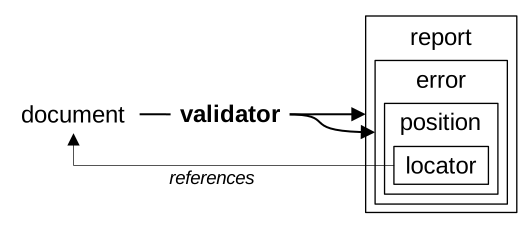
Figure 1 illustrates the validation process and core concepts of this specification: a validator checks whether a document conforms to some requirements and returns either a list of errors or a report including such a list in return. Each error can reference elements of the document via a position having locators. A locator may further contain nested errors or reports.
1.2 Background
Every document conforms to a document model. For instance, JSON documents conform to the JSON model, and character strings conforms to the model “sequence of characters from a known character set.” Document models come with encodings that express documents in the form of documents on a lower level. For instance, JSON documents can be encoded with JSON syntax as Unicode strings and Unicode strings can be encoded with UTF-8 as sequences of bytes (solid arrows in Figure 2).
Eventually all documents are given as digital objects, encoded as sequences of bytes. Encodings using a sequence of characters are also called textual data formats, in contrast to binary data formats.
An error position is given in the form of one or more locators, each having a dimension and an address. Each dimension refers to a locator format for a set of document models. For instance, JSON Pointer refers to JSON; character and line numbers refer to character strings with defined line breaks; and offsets refer to sequences of elements (Figure 2). Other examples of locator formats include XPath for XML and row/column for tabular data.
Locators can contain nested errors or reports to reference more specific errors on a lower level of description, for instance, to files in an archive or individual records in a file.
1.3 Examples
Documents can be invalid on many levels. For example, the string {"åå":5} is valid JSON, but it might be invalid if element åå is expected to hold a string instead of a number (Example 1). The error can be located with a JSON Pointer in the JSON document and with character and line number.
{
  "message": "Expected string, got number at element /åå",
  "position": { "jsonpointer": "/åå", "char": "7", "line": "1" }
}The string could also be part of a larger, newline-delimited JSON document. In this case it makes sense to use a nested error (Example 2).
{
  "message": "Invalid document at line 7",
  "position": [ {
    "dimension": "line",
    "address": "7",
    "errors": [ {
      "message": "Expected string, got number at element /åå",
      "position": {
        "jsonpointer": "/åå", "char": "7", "line": "1"
      }
    } ]
  } ]
}The document could also be invalid at JSON syntax level, for example, if the closing } is missing (Example 3).
{
  "message": "Unexpected end of JSON input at character 8",
  "position": { "line": "1", "char": "8"  }
}A similar document could be invalid on a byte level. The following table illustrates the document from Example 1 with ninth byte replaced by a value not allowed in UTF-8. It is common practice to replace such bytes with the Unicode replacement character U+FFFD, but the resulting Unicode string is still invalid JSON syntax (Example 4). The example also illustrates another locator format linecol to give a character position by line and column.
| Byte | 7b |
22 |
c3 |
a5 |
c3 |
a5 |
22 |
3a |
c0 |
7d |
| Code point | U+007B |
U+0022 |
U+00E5 |
U+00E5 |
U+007B |
U+0022 |
ERROR⇒ U+FFFD |
U+0022 |
||
| Character | { |
" |
å |
å |
" |
: |
� |
} |
||
[
  {
    "level": "warning",
    "message": "Ill-formed UTF-8 byte sequence at offset 8",
    "position": { "line": "1", "char": "7", "offset": "8" }
  },
  {
    "level": "error",
    "message": "Expected JSON value at line 1, column 7",
    "position": { "line": "1", "char": "7", "linecol": "1:7" }
  }
]1.4 Conformance requirements
The key words “MUST”, “MUST NOT”, “REQUIRED”, “SHOULD”, “SHOULD NOT”, “RECOMMENDED”, “NOT RECOMMENDED”, “MAY”, and “OPTIONAL” in this document are to be interpreted as described in BCP 14 (RFC 2119 and RFC 8174) when, and only when, they appear in all capitals, as shown here.
Formal grammars in this specification are given in EBNF notation as defined in Extensible Markup Language (XML) 1.1 section 6.
Only section 2 to 5 (excluding examples and notes) and the list of normative references are normative parts of this specification.
2 Errors
An error is a JSON object with the following constraints:
An error SHOULD have a field
messagewith an error message, being a non-empty string. Applications MAY use a default value for error messages.An error MAY have a field
typeswith an array of error types, each being a non-empty string. Error types can be used for grouping errors and to reference a cause or constraint being violated by the error. Error types SHOULD be URIs (RFC 3986) or local identifiers with the same syntax as the name of a dimension.An error MAY have a field
levelwith an error level, being one of the stringserror,warning, orinfo. Application MUST use default valueerrorif this field is not given.An error MAY have a field
positionwith a position. Applications MUST NOT differentiate between no position and an empty position (an empty array or an empty JSON object).
Applications MUST use individual errors for individual positions of the kind of observation represented by the error. For instance, a malformed character occurring two times in a document results in two errors with a common error type.
By this definition the error {} is allowed and equivalent to {"level":"error"}.
A nested error is an error that is listed as part of a locator in its field errors or reports.
Language and localization of error messages and details of error types such as name and URL are out of the scope of this specification.
3 Positions
The position of an error is given:
either in condensed form with a locator map,
or in full form as a JSON array of locators.
Every locator map can be transformed to an equivalent array of locators. The reverse transformation is only possible if no locator has nested errors and there is not more than one locator per dimension.
A position with multiple locators of the same dimension does not imply multiple errors, but it references multiple elements involved in the same error (for instance, a mismatch between two elements). Locators of different dimensions in the same position SHOULD refer to the same elements or have a common intersection.
3.1 Locator maps
A locator map is a JSON object that maps names of dimensions to addresses.
{ "line": "7", "char": "42" }A locator map can be transformed to an equivalent array of locators with the key and value of the JSON object entries mapped to the field dimension and address of each locator.
[
  { "dimension": "line", "address": "7" },
  { "dimension": "char", "address": "42" }
]Applications MAY restrict their support of the Data Validation Report Format to positions in condensed form being locator maps.
3.2 Locators
A locator references an element of a document. A locator is a JSON object with the following constraints:
A locator MUST have a field
dimensionwith the name of a dimension. Some dimensions imply a document model on elements referenced by locators of this dimension.A locator MUST have a field
addresswith the address, being a string conforming to the locator format identified by the name of the dimension.A locator MAY have a field
valuewith the referenced element encoded as a JSON object that maps document model names (some included in the table of dimensions) to serializations in some reasonable form (typically as a JSON string). The value MUST be derived from the document, dimension, and address. Applications MAY replace the field with another value derived from document, dimension, and address.A locator MAY have either the field
errorswith an array of errors within the located element or the fieldreportswith an array of reports for the located element. Errors in the fielderrorsof a locator or as part of a report are called nested errors.
{ "dimension": "line", "address": "7" }Nested errors allow to reference locations within elements of a document. Positions of nested errors MUST be relative to the element referenced by their parent locator (Example 8 and Example 9):
{
  "message": "Invalid value in line 2 in file example.txt in file archive.zip",
  "position": [ {
    "dimension": "file",
    "address": "archive.zip",
    "errors": [ {
      "message": "Invalid value in line 2 in file example.txt",
      "position": [ {
        "dimension": "file",
        "address": "example.txt",
        "errors": [ {
          "message": "Invalid value in line 2",
          "position": { "line": "2" }
        } ]
      } ]
    } ]
  } ]
}example.txt in archive archive.zip
{
  "message": "Invalid character in line 7, column 3",
  "position": [ {
    "dimension": "linecol",
    "address": "7:3"
  }, {
    "dimension": "line",
    "address": "7",
    "errors": [ {
      "message": "Invalid character 3",
      "position": { "char": "3" }
    } ]
  } ]
}4 Reports
Reports summarize errors of the same type with additional metadata. A report is a JSON object with the following constraints:
A report MAY have a field
typeswith an array of error types.A report MUST have a field
errorswith an array of zero or more errors, optionally followed by the valuenullto indicate an incomplete list.A report SHOULD have a field
totalErrorswith a non-negative integer number. The number MUST be equal to the length of arrayerrorsif the array does not contain the valuenull, and it MUST be equal to or larger than the length of the array if it does containnull.A report MAY have a field
complianceswith an array of positions, optionally followed by the valuenullto indicate an incomplete list. Positions in fieldcompliancesMUST NOT contain nested errors.A report MAY have a field
totalComplianceswith a non-negative integer number. The number MUST be equal to the length of arraycompliancesif the array does not contain the valuenull, and it MUST be equal or larger than the length of the array if it does containnull.A report MAY have a field
skippedwith an array of positions, optionally followed by the the valuenullto indicate an incomplete list. Positions in field theskippedMUST NOT contain nested errors.A report MAY have a field
totalSkippedwith a non-negative integer number. The number MUST be equal to the length of arrayskippedif the array does not contain the valuenull, and it MUST be equal or larger than the length of the array if it does containnull.A report MAY have a field
totalFindingswith a non-negative integer number. The number MUST be equal to the sum oftotalCompliances,totalErrors, andtotalSkippedif all of these fields are given.A report SHOULD have a field
partialwith a boolean value indicating when the document was not fully validated, or an array of errors. The errors listed in this array MUST NOT be confused with validation errors found by validation. Instead, they refer to errors of the execution of the validation process.A report MAY have a field
durationwith a non-negative number giving the time in seconds it took to create the report.
Applications MUST process errors listed in field errors by implicitly adding every error type of the report to field types of the error, unless it already exists in the array.
{
  "dimension": "file",
  "address": "records.xml",
  "reports": [
    {
      "types": [ "record-must-be-valid" ],
      "errors": [
        { "position": { "xpath": "/records/record[2]" } }
      ],
      "compliances": [
        { "xpath": "/records/record[1]" },
        { "xpath": "/records/record[3]" }
      ]
    }
  ]
}5 Dimensions
A dimension is a defined method to reference elements of a document. Each dimension has:
A unique name, being a string that starts with a lowercase letter
atoz, optionally followed by a sequence of lowercase letters and digits0to9.A locator format, being a formal language of Unicode strings to encode references to elements of a document. The sets of strings of the language are called addresses.
A document model matching the locator format.
Some dimensions imply a document model on referenced elements (element model). For instance, a line number references a character string and a JSON Pointer references a JSON value.
Applications SHOULD support the following dimensions. The appendix contains a non-normative note on additional dimensions not fully specified yet.
| name | locator format | document model | element model |
|---|---|---|---|
id |
identifier | indexed set of elements | - |
offset |
offset number | sequence of elements | - |
char |
character number | character string (string) |
character |
line |
line number | sequence of character strings | character string |
lines |
line numbers | sequence of character strings | sequence of character strings |
linecol |
line and column | sequence of character strings | character |
cell |
cell reference | tabular data | - |
cells |
cell range | tabular data | tabular data |
rfc7111 |
table selection | tabular data | tabular data |
file |
file path | directory tree | - |
jsonpointer |
JSON Pointer | JSON value (json) |
JSON value |
xpath |
XML Locator | XML or compatible hierarchies (xml) |
XML element or attribute |
The identifier locator format with name id and locator values being arbitrary Unicode strings subsumes every other locator format because locators of the same value reference the same element. It can be used for any kind of formalized reference to elements of a document, but its main use cases are record identifiers, unique names, and similar identifier systems.
Dimensions are a subset of query languages. A dimension value references one element from a document. A query language (e.g., JSONPath, full XPath…) can locate a set of elements.
The following EBNF grammar rules are used to define grammars of locator values:
PositiveInteger ::= [1-9] [0-9]*5.1 Sequential document models
Offset number
The offset number locator format with name number is used to reference an element in a sequence of elements. The locator value is non-negative integer encoded as a string without leading zeros. The first element has number zero (locator value 0).
OffsetNumber        ::=  NonNegativeInteger
NonNegativeInteger  ::=  "0" | PositiveInteger
Character number
The character number locator format with name char is used to reference a character in a sequence of characters from a character set. The locator value is a positive integer encoded as a string without leading zeros. The first character has number one (locator value 1).
In Unicode strings, this locator format refers to code points instead of visual characters.
CharacterNumber ::= PositiveIntegerLine number
The line number locator format with name line is used to reference a line in a sequence of lines, each being a character string. The locator value is a positive integer encoded as a string without leading zeros. The first line has number one (locator value 1).
The document model of line number is not a character string with line breaks but a sequence of character strings. Splitting of character strings into lines is beyond the scope of this specification because multiple definitions of line break exist (U+0A optionally followed by U+0D, U+0D, U+0B, U+0C, U+85, U+2028, U+2029…).
LineNumber ::= PositiveIntegerLine numbers
The line numbers locator format with name lines is used to reference a sequence of consecutive lines (each being a character string) from a sequence of lines. The locator value is two positive integers encoded as a string without leading zeros and separated with a minus (-). The second integer MUST NOT be larger than the first. The first line has number one (locator value 1).
LineNumbers     ::=  StartLine "-" EndLine
StartLine       ::=  PositiveInteger
EndLine         ::=  PositiveInteger
Line and Column
The line and column locator format with name linecol is used to reference a character in a sequence of character strings. The locator value consists of a line number and a character number within the line, separated by a colon (:).
LineCol ::= LineNumber ":" CharacterNumber5.2 Tabular document models
Tabular data is known from spreadsheet software and CSV files. This document model does not include table headers! A table with a header column and unique column names can better be mapped to a hierarchical model or modelled as a sequence of indexed sets. For instance, an error in the column title of the third row of a table (not counting the header row) could have the following locator:
{
  "dimension": "offset", "address": "3",
  "errors": [ {
    "message": "Malformed 'title' field!",
    "position": [ { "dimension": "id", "address": "title" } ]
  } ]
}
Cell reference
The cell reference locator format with name cell is used to reference an individual cell in tabular data. The locator value consists of a pair of column and row. Columns are given in the hexavigesimal system (A=1, B=2…, Z=26, AA=27, AB=28…) and rows are given by numbers, starting from 1.
CellRef         ::=  ColumnRef RowRef
ColumnRef       ::=  [A-Z]+
RowRef          ::=  PositiveInteger
Cell range
The cell range locator format with name cells is used to reference a selection of connected cells in tabular data. The locator value consists of a cell reference, optionally followed by colon (:) and another cell reference.
CellRange ::= CellRef ":" CellRefTable selection
The table selection locator format with name rfc7111 is used to reference a selection of connected cells in tabular data. It can reference cell references, cell ranges, full rows, and full columns. The locator format follows the following grammar:
TableSelection  ::=  Cells | Rows | Columns
Cells           ::=  "cell=" CellPosition ( "-" CellPosition )?
Rows            ::=  "row=" RowPosition ( "-" RowPosition )?
Columns         ::=  "col=" ColPosition ( "-" ColPosition )?
CellPosition    ::=  RowPosition "," ColPosition
ColPosition     ::=  PositiveInteger
RowPosition     ::=  PositiveInteger
Tabular selection locator is a proper subset of RFC 7111 URI Fragment Identifier, excluding multi-selections, so every elememt referenced by a table selection is also tabular data.
5.3 Hierarchical document models
File path
The file path locator format with name file is used to reference a file or directory in a directory tree. The locator value must be a POSIX path, being a string optionally beginning with a slash (/), followed by zero or more file names separated by slash. A file name is a non-empty sequence of Unicode code points excluding the slash (U+002F) and the null byte (U+0000).
JSON Pointer
The JSON Pointer locator format with name jsonpointer is used to reference a JSON value within a JSON value. The locator value and its semantics are defined in RFC 6901.
XML Locator
The XML Locator format follows the following grammar with the rule QName defined in Namespaces in XML 1.0 specification:
XMLLocator       ::=  ( "/" NodeTest )+ ( "/" AttributeTest )?
NodeTest         ::=  QName Position?
AttributeTest    ::=  "@" QName
Position         ::=  "[" PositiveInteger "]"
Applications MUST NOT use one XML Locator to reference multiple XML elements. Applications MAY always append the string [1] to an XML Locator if it does not end with a Position or an AttributeTest.
XML Locator is a proper subset of (X)Path Expressions from XPath specifications limited to reference individual XML elements or attributes.
6 References
6.1 Normative References
Berners-Lee, T. and Fielding, R. and Masinter, L.: Uniform Resource Identifier (URI): Generic Syntax. RFC 3986, January 2005, http://www.rfc-editor.org/info/rfc3986.
Bradner, S.: Key words for use in RFCs to Indicate Requirement Levels. BCP 14, RFC 2119, March 1997, http://www.rfc-editor.org/info/rfc2119.
Bray, T.: The JavaScript Object Notation (JSON) Data Interchange Format. RFC 8259, December 2017. https://tools.ietf.org/html/rfc8259
Bray, T. et al: Extensible Markup Language (XML) 1.1 (Second Edition). W3C Recommendation. August 2006. W3C Recommendation. https://www.w3.org/TR/xml11/
Bray, T. et. al.: Namespaces in XML 1.0 (Third Edition). W3C Recommendation, December 2009. https://www.w3.org/TR/REC-xml-names/
Bryan, P and Zyp, K. and Nottigham, M.: JavaScript Object Notation (JSON) Pointer. RFC 6901, April 2023. https://tools.ietf.org/html/rfc6901
Leiba, B.: Ambiguity of Uppercase vs Lowercase in RFC 2119 Key Words. BCP 14, RFC 8174, May 2017. http://www.rfc-editor.org/info/rfc8174.
6.2 Informative references
J. Clark and S. DeRose: XML Path Language (XPath) Version 1.0. W3C Recommendation, November 1999. https://www.w3.org/TR/xpath-10/
M. Hausenblas, E. Wilde, and J. Tennison: URI Fragment Identifiers for the text/csv Media Type. RFC 7111, January 2014. https://tools.ietf.org/html/rfc7111
A. Wright, H. Andrews, B. Hutton, and G. Dennis: JSON Schema Draft 2020-12. June 2022. https://json-schema.org/draft/2020-12/json-schema-core.html
Appendices
Changelog
Version 1.0.0 (2026-06-22) published as https://doi.org/10.5281/zenodo.20792191. Main addition is introduction of error reports based on results of project AQinDa.
Version 0.1.0 was written and made public in June 2025 after the format had been used since Feburary 2022.
See https://github.com/gbv/validation-error-format/ for current draft version and issue tracker for feedback.
Acknowledgements
Thanks to Markus Matoni and Arno Kesper for their work on project AQinDa that resulted in the inclusion of error reports in this specification.
JSON Schema
Error records can be validated with the following non-normative JSON Schema (schema.json in the specification repository):
{
  "$schema": "http://json-schema.org/draft-07/schema#",
  "type": "object",
  "properties": {
    "message": { "type": "string", "minLength": 1 },
    "types": { "$ref": "#/$defs/types" },
    "level": {
      "type": "string",
      "enum": ["error", "warning", "info"],
      "default": "error"
    },
    "position": { "$ref": "#/$defs/position" }
  },
  "$defs": {
    "errors": {
      "type": "array",
      "items": { "$ref": "#" }
    },
    "types": {
      "type": "array",
      "items": {
        "type": "string",
        "minLength": 1
      }
    },
    "position": {
      "anyOf": [
        {
          "type": "array",
          "items": {
            "$ref": "#/$defs/locator"
          }
        },
        { "$ref": "#/$defs/namedMap" }
      ]
    },
    "locator": {
      "type": "object",
      "allOf": [
        {
          "properties": {
            "dimension": {
              "type": "string",
              "pattern": "^[a-z][a-z0-9]*$"
            },
            "address": { "type": "string" },
            "value": { "$ref": "#/$defs/namedMap" }
          }
        }, {
          "oneOf": [
            {
              "properties": {
                "errors": { "$ref": "#/$defs/errors" }
              },
              "properties": {
                "reports": {
                  "type": "array",
                  "items": { "$ref": "#/$defs/report" }
                }
              }
            }
          ]
        } ],
      "required": ["dimension", "address"]
    },
    "positions": {
      "type": "array",
      "items": {
        "anyOf": [
          { "$ref": "#/$defs/position" },
          { "const": null }
        ]
      }
    },
    "namedMap": {
      "type": "object",
      "patternProperties": {
        "^[a-z][a-z0-9]*$": {
          "type": "string"
        }
      },
      "additionalProperties": false
    },
    "report": {
      "type": "object",
      "properties": {
        "types": { "$ref": "#/$defs/types" },
        "errors": {
          "type": "array",
          "items": {
            "anyOf": [
              { "$ref": "#" },
              { "const": null }
            ]
          }
        },
        "compliances": { "$ref": "#/$defs/positions" },
        "skipped": { "$ref": "#/$defs/positions" },
        "totalErrors": { "type": "integer", "minimum": 0 },
        "totalCompliances": { "type": "integer", "minimum": 0 },
        "totalSkipped": { "type": "integer", "minimum": 0 },
        "totalFindings": { "type": "integer", "minimum": 0 },
        "partial": { "oneOf": [
          { "type": "boolean" },
          { "type": "array", "items": { "$ref": "#" } }
        ] },
        "duration": { "type": "number", "minimum": 0 }
      },
      "required": ["errors"]
    }
  }
}
Additional dimensions
The following locator formats or standards are being considered for addition as dimensions:
fq
The fq tool supports analysis of many binary formats so it could be used to locate elements of binary data models. The locator value would be the format, followed by a colon, followed by a path expression:
{
  "message": "Timestamp of .gz archive must not be in the future",
  "position": {
    "fq": "gzip:.members[0].mtime"
  }
}

{
  "message": "Image width of PNG file is too large",
  "position": {
    "fq": "png:.chunks[0].width"
  }
}
rdfterm
The dimension with name rdfterm follows locator format object of RDF 1.1. N-Triples Grammar to locate an RDF term in a RDF graph, both defined in as defined in RDF 1.1 Concepts and Abstract Syntax.
The locator format could also be used to locate the focus node of a SHACL Validation Report.
turtle
The dimension with name turtle follows RDF-Turtle syntax to locate a set of RDF Triples in a RDF graph.
triplepattern
The dimension with name triplepattern follows of locator format subset of Property Path Pattern from SPARQL 1.1 Query Language to locate a set of RDF Triples in a RDF graph.
The locator format could also be used to reference the focus node, path and value of a SHACL Validation Report.